Ambrosia data preprocessing tools overview
This example describes the data preprocessing methods which are implemented in the library. For the demonstration of these tools usage, synthetically generated one week data of daily content views by users is used.
Data processing tools are the number of classes that have the same access interface - they have set of implemented methods that are intuitive to the users:
fit - get the necessary for class parameters from the passed datatransform - make transformation of the passed datafit_transform - combine the above two methodsget_params_dict - get a dict of fitted paramsload_params_dict - set a dict of pre-fitted paramsstore_params - store fitted params to a fileload_params - load pre-fitted params from a fileLet’s take a look on some of preprocessing classes in the context of processing our user dataset.
[2]:
import numpy as np
import pandas as pd
import seaborn as sns

from ambrosia.preprocessing import (AggregatePreprocessor, RobustPreprocessor,
                                    IQRPreprocessor, LogTransformer,
                                    BoxCoxTransformer)
Load data
[3]:
data = pd.read_csv('../tests/test_data/week_metrics.csv')
[4]:
data.head()
[4]:
| id | gender | watched | sessions | day | platform | |
|---|---|---|---|---|---|---|
| 0 | 0 | Male | 28.440846 | 4 | 1 | android |
| 1 | 1 | Female | 1.825271 | 2 | 1 | ios |
| 2 | 2 | Female | 46.995606 | 0 | 1 | web |
| 3 | 3 | Female | 37.310264 | 1 | 1 | ios |
| 4 | 4 | Female | 147.513105 | 0 | 1 | web |
Data aggregation
In our task, we would like to first aggregate data by user in order, for example, to get a more reliable statistical picture of the views metric and get rid of intra-user the dependency.
For this we will use the AggregatePreprocessor class, which allows us to aggregate categorical and continuous variables in a convenient way.
The default aggregation behavior is set at instantiation time. However, when aggregating, we can always use the more detailed agg_params parameter, which sets own aggregation method for each metric.
[5]:
aggregator = AggregatePreprocessor(categorial_method='mode', real_method='sum')
Now fit aggregator and transform the data
[6]:
aggregator.fit_transform(dataframe=data,
                         groupby_columns='id',
                         real_cols=['watched', 'sessions'],
                         categorial_cols=['gender', 'platform'])
[6]:
| id | watched | sessions | gender | platform | |
|---|---|---|---|---|---|
| 0 | 0 | 772.597224 | 8 | Male | ios |
| 1 | 1 | 538.076739 | 15 | Female | android |
| 2 | 2 | 288.492353 | 20 | Female | android |
| 3 | 3 | 373.620408 | 9 | Female | ios |
| 4 | 4 | 630.238862 | 14 | Female | ios |
| ... | ... | ... | ... | ... | ... |
| 4995 | 4995 | 390.133588 | 14 | Male | android |
| 4996 | 4996 | 544.423724 | 25 | Female | ios |
| 4997 | 4997 | 204.713032 | 19 | Male | android |
| 4998 | 4998 | 1088.642872 | 25 | Female | web |
| 4999 | 4999 | 405.817078 | 11 | Male | android |
5000 rows × 5 columns
The instance is fitted now and we can see its parameters
[7]:
aggregator.get_params_dict()
[7]:
{'aggregation_params': {'watched': 'sum',
  'sessions': 'sum',
  'gender': 'mode',
  'platform': 'mode'},
 'groupby_columns': 'id'}
These parameters can be saved as a json file and loaded in the future for the same aggregation tasks. But first let’s refit the aggregator using detailed aggregation. You can use aliases for aggregation or pass pandas compatible methods.
[8]:
# Add extra column before
data['is_holiday'] = data['day'].apply(lambda x: 0 if x < 6 else 1)
[9]:
aggregator.fit_transform(
    data,
    groupby_columns=['id', 'is_holiday'],
    agg_params={
        'watched': 'sum',
        'sessions': 'max',
        'gender': 'simple',  # simple - choose the first possible value
        'platform': 'mode'
    })
[9]:
| id | is_holiday | watched | sessions | gender | platform | |
|---|---|---|---|---|---|---|
| 0 | 0 | 0 | 601.893096 | 4 | Male | ios |
| 1 | 0 | 1 | 170.704127 | 1 | Male | android |
| 2 | 1 | 0 | 327.533247 | 3 | Female | web |
| 3 | 1 | 1 | 210.543492 | 6 | Female | ios |
| 4 | 2 | 0 | 271.548875 | 7 | Female | web |
| ... | ... | ... | ... | ... | ... | ... |
| 9995 | 4997 | 1 | 65.368574 | 2 | Male | ios |
| 9996 | 4998 | 0 | 1051.360035 | 4 | Female | web |
| 9997 | 4998 | 1 | 37.282837 | 10 | Female | android |
| 9998 | 4999 | 0 | 245.553217 | 6 | Male | android |
| 9999 | 4999 | 1 | 160.263861 | 2 | Male | ios |
10000 rows × 6 columns
Check and store instance parameters in a file
[10]:
aggregator.get_params_dict()
[10]:
{'aggregation_params': {'watched': 'sum',
  'sessions': 'max',
  'gender': 'simple',
  'platform': 'mode'},
 'groupby_columns': ['id', 'is_holiday']}
[11]:
aggregator.store_params('_examples_configs/aggregator.json')
Create new instance
[12]:
aggregator_loaded = AggregatePreprocessor()
Load parameters
[13]:
aggregator_loaded.load_params('_examples_configs/aggregator.json')
[14]:
aggregator_loaded.get_params_dict()
[14]:
{'aggregation_params': {'watched': 'sum',
  'sessions': 'max',
  'gender': 'simple',
  'platform': 'mode'},
 'groupby_columns': ['id', 'is_holiday']}
Aggregate data
[15]:
data_aggregated = aggregator_loaded.transform(data)
[16]:
data_aggregated.head()
[16]:
| id | is_holiday | watched | sessions | gender | platform | |
|---|---|---|---|---|---|---|
| 0 | 0 | 0 | 601.893096 | 4 | Male | ios |
| 1 | 0 | 1 | 170.704127 | 1 | Male | android |
| 2 | 1 | 0 | 327.533247 | 3 | Female | web |
| 3 | 1 | 1 | 210.543492 | 6 | Female | ios |
| 4 | 2 | 0 | 271.548875 | 7 | Female | web |
Cleaning the outliers
In many problems, we need to get rid of outliers in the data in order to make the results more reliable and applied statistical tests more sensitive.
RobustPreprocessor and IQRPreprocessor.RobustPreprocessor
The RobustPreprocessor removes objects that fall into the tails of the empirical distribution of the metrics that is estimaed form the passed data. The type of tail and its size for threshold calculation is specified by the user during fitting the data.
Let’s create an instance
[17]:
robust_transformer = RobustPreprocessor()
Fit transformer
[18]:
robust_transformer.fit(dataframe=data_aggregated,
                       column_names='watched',
                       alpha=0.01,
                       tail='right')
[18]:
<ambrosia.preprocessing.robust.RobustPreprocessor at 0x13ebc0c40>
Check fitted params
[19]:
robust_transformer.get_params_dict()
[19]:
{'tail': 'right',
 'column_names': ['watched'],
 'alpha': [0.01],
 'quantiles': [[1049.5734329308516]]}
Transform data (1% of rows will be removed, because this is the same dataframe)
[20]:
robust_transformer.transform(data_aggregated)
ambrosia LOGGER: Making right-tail robust transformation of columns ['watched']
                 with alphas = [0.01]
ambrosia LOGGER:

ambrosia LOGGER: Change Mean watched: 350.8333 ===> 342.2530
ambrosia LOGGER: Change Variance watched: 56929.6826 ===> 49971.0812
ambrosia LOGGER: Change IQR watched: 331.3509 ===> 325.2846
ambrosia LOGGER: Change Range watched: 1566.7685 ===> 1047.1196
[20]:
| id | is_holiday | watched | sessions | gender | platform | |
|---|---|---|---|---|---|---|
| 0 | 0 | 0 | 601.893096 | 4 | Male | ios |
| 1 | 0 | 1 | 170.704127 | 1 | Male | android |
| 2 | 1 | 0 | 327.533247 | 3 | Female | web |
| 3 | 1 | 1 | 210.543492 | 6 | Female | ios |
| 4 | 2 | 0 | 271.548875 | 7 | Female | web |
| ... | ... | ... | ... | ... | ... | ... |
| 9994 | 4997 | 0 | 139.344458 | 6 | Male | android |
| 9995 | 4997 | 1 | 65.368574 | 2 | Male | ios |
| 9997 | 4998 | 1 | 37.282837 | 10 | Female | android |
| 9998 | 4999 | 0 | 245.553217 | 6 | Male | android |
| 9999 | 4999 | 1 | 160.263861 | 2 | Male | ios |
9900 rows × 6 columns
For all our preprocessing classes we have same methods for storing and loading parameters. This is useful to process the data in the future in the same way.
[21]:
robust_transformer.store_params('_examples_configs/robust.json')
Recreate instance
[22]:
del robust_transformer

robust_transformer = RobustPreprocessor()
Load params
[23]:
robust_transformer.load_params('_examples_configs/robust.json')
Transform data (we get the same transformation as before)
[24]:
robust_transformer.transform(data_aggregated)
ambrosia LOGGER: Making right-tail robust transformation of columns ['watched']
                 with alphas = [0.01]
ambrosia LOGGER:

ambrosia LOGGER: Change Mean watched: 350.8333 ===> 342.2530
ambrosia LOGGER: Change Variance watched: 56929.6826 ===> 49971.0812
ambrosia LOGGER: Change IQR watched: 331.3509 ===> 325.2846
ambrosia LOGGER: Change Range watched: 1566.7685 ===> 1047.1196
[24]:
| id | is_holiday | watched | sessions | gender | platform | |
|---|---|---|---|---|---|---|
| 0 | 0 | 0 | 601.893096 | 4 | Male | ios |
| 1 | 0 | 1 | 170.704127 | 1 | Male | android |
| 2 | 1 | 0 | 327.533247 | 3 | Female | web |
| 3 | 1 | 1 | 210.543492 | 6 | Female | ios |
| 4 | 2 | 0 | 271.548875 | 7 | Female | web |
| ... | ... | ... | ... | ... | ... | ... |
| 9994 | 4997 | 0 | 139.344458 | 6 | Male | android |
| 9995 | 4997 | 1 | 65.368574 | 2 | Male | ios |
| 9997 | 4998 | 1 | 37.282837 | 10 | Female | android |
| 9998 | 4999 | 0 | 245.553217 | 6 | Male | android |
| 9999 | 4999 | 1 | 160.263861 | 2 | Male | ios |
9900 rows × 6 columns
The dispersion characteristics of the data have decreased.
IQRPreprocessor
The IQRPreprocessor class removes objects that go beyond the maximum and minimum values of the constructed boxplot based on the passed data with empirical distribution of the metrics.
Again create an instance
[25]:
iqr_transformer = IQRPreprocessor()
Fit (this time we will use two metrics)
[26]:
iqr_transformer.fit(dataframe=data_aggregated,
                    column_names=['watched', 'sessions'])
[26]:
<ambrosia.preprocessing.robust.IQRPreprocessor at 0x13ec32370>
Look at fitted params
[27]:
iqr_transformer.get_params_dict()
[27]:
{'column_names': ['watched', 'sessions'],
 'medians': [304.98240670946467, 4.0],
 'quartiles': [[161.81242236582537, 493.1633345302498], [2.0, 7.0]]}
Transform data
[28]:
data_aggregated = iqr_transformer.transform(data_aggregated)
ambrosia LOGGER: Making IQR transformation of columns ['watched', 'sessions']
ambrosia LOGGER:

ambrosia LOGGER: Change Mean watched: 350.8333 ===> 338.0876
ambrosia LOGGER: Change Variance watched: 56929.6826 ===> 47660.8027
ambrosia LOGGER: Change IQR watched: 331.3509 ===> 321.3204
ambrosia LOGGER: Change Range watched: 1566.7685 ===> 987.6670
ambrosia LOGGER:

ambrosia LOGGER: Change Mean sessions: 4.8478 ===> 4.5908
ambrosia LOGGER: Change Variance sessions: 12.5680 ===> 9.5394
ambrosia LOGGER: Change IQR sessions: 5.0000 ===> 4.0000
ambrosia LOGGER: Change Range sessions: 30.0000 ===> 14.0000
Check how many rows have been removed
[29]:
data_aggregated.shape
[29]:
(9662, 6)
Class instance parameters can be stored and loaded from a file as well as for other classes.
Metric tranformations
For some tasks, we may want to transform metrics, for example, to reduce the variance or make distribution shape more normal (however, be careful with this procedure, as you may lose the interpretability of the metrics).
LogTransformer, BoxCoxTransformer.watched data.LogTransformer
This transformer simply applied a logarithmic transformation to the metrics. Since it has the same interface as other classes, we still need to fit it to the data and it will fit only the names of the columns.
Create an instance
[30]:
log_transformer = LogTransformer()
Fit transformer
[31]:
log_transformer.fit(dataframe=data_aggregated, column_names=['watched'])
[31]:
<ambrosia.preprocessing.transformers.LogTransformer at 0x13ec3f580>
Transform data
[32]:
data_aggregated_logged = log_transformer.transform(data_aggregated)
Make sure that the variance of the metric has decreased after the transformation
[33]:
print('Original std:', data_aggregated.watched.std())
print('Log metric std:', data_aggregated_logged.watched.std())
Original std: 218.32484049843603
Log metric std: 0.827898247795576
Class instance parameters can be stored and loaded from a file.
BoxCoxTransformer
lambda_ power parameter of the transformation is selected automatically during fitting.Create an instance
[34]:
boxcox_transformer = BoxCoxTransformer()
Fit transformer
[35]:
boxcox_transformer.fit(dataframe=data_aggregated, column_names=['watched'])
[35]:
<ambrosia.preprocessing.transformers.BoxCoxTransformer at 0x13ec4a460>
Transform data
[36]:
boxcox_transformer.transform(data_aggregated)
[36]:
| id | is_holiday | watched | sessions | gender | platform | |
|---|---|---|---|---|---|---|
| 0 | 0 | 0 | 34.356077 | 4 | Male | ios |
| 1 | 0 | 1 | 18.974271 | 1 | Male | android |
| 2 | 1 | 0 | 25.887571 | 3 | Female | web |
| 3 | 1 | 1 | 20.991262 | 6 | Female | ios |
| 4 | 2 | 0 | 23.696137 | 7 | Female | web |
| ... | ... | ... | ... | ... | ... | ... |
| 9994 | 4997 | 0 | 17.188778 | 6 | Male | android |
| 9995 | 4997 | 1 | 11.753853 | 2 | Male | ios |
| 9997 | 4998 | 1 | 8.726168 | 10 | Female | android |
| 9998 | 4999 | 0 | 22.590802 | 6 | Male | android |
| 9999 | 4999 | 1 | 18.402294 | 2 | Male | ios |
9662 rows × 6 columns
Check fitted parameters
[37]:
boxcox_transformer.get_params_dict()
[37]:
{'column_names': ['watched'], 'lambda_': [0.4314844480895849]}
Store them in a file
[38]:
boxcox_transformer.store_params('_examples_configs/boxcox_tranformer.json')
Create new instance
[39]:
boxcox_transformer_loaded = BoxCoxTransformer()
Load params
[40]:
boxcox_transformer_loaded.load_params(
    '_examples_configs/boxcox_tranformer.json')
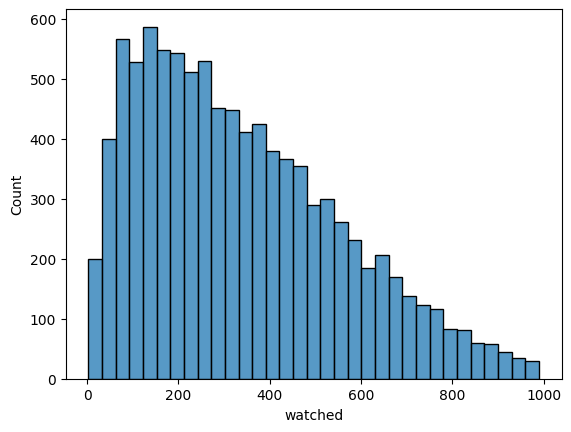
Transform metric and compare distribution shape with the unchanged one
[41]:
sns.histplot(data_aggregated.watched)
[41]:
<AxesSubplot:xlabel='watched', ylabel='Count'>
[42]:
sns.histplot(boxcox_transformer_loaded.transform(data_aggregated).watched)
[42]:
<AxesSubplot:xlabel='watched', ylabel='Count'>
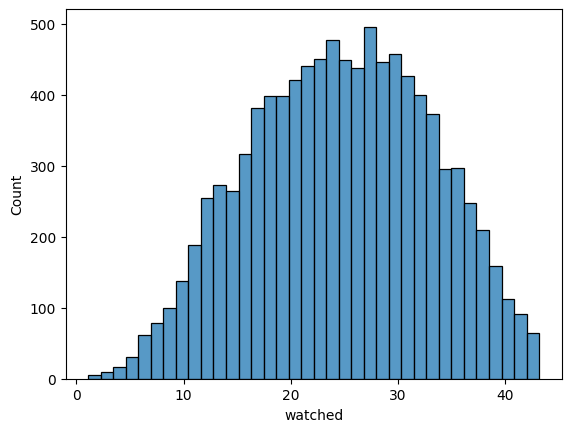
Metric distribution becomes more normal
One note: for convenience, all transformers can apply their transformation directly to the passed dataframe, just set the inplace parameter to True in the corresponding transformation method.
Ambrosia preprocessing functionality is not limited to these classes
Check:
An overview of advanced metric transformation to learn about different methods for reducing variance
An overview of the
Preprocessorclass - a convenient chain pipeline transformer that combines almost all available preprocessing techniques in its methodsAmbrosia preprocessing modules documentation